Schedonomy® Science

  • Home
  • Services
  • Read All About It
  • Exercises
  • Contact Us
  • About the Author

Tag Archives: Schedule

Time Independant Workload

15th August, 2013 · andrehoude · Leave a comment

Looking at the list of workloads in our grocery example, you’ll notice that the Clerk has the most time-independent tasks. He only has one time-dependant task which is to answer customer questions. Although it is a valid task that should be part of a job description, it can’t really add significant workload to that person. A question will take much less than one minute and you may have one for each 50 customers that come in. Therefore, the Clerk workload could be considered a time-independent workload altogether.


Since this workload is not tied to a particular time of the day, a planner still needs to evaluate and put time on each task. The trick is to represent that work in the form of hours per day. So if you evaluate each task and sum them, you may end up with 5 hours per day for example. This sum may also change per day of the week. There may not be any delivery truck to unload on Sundays. Therefore, the Clerk workload will have a lower sum on that day.


This will bring you to different sums on each weekday. Figure 2 shows an example of these sums.


Figure 2. Time-independent workload


You will also find that even though this work is more regular, it is exposed to seasonal trends just like the cashier workload. This clerk will be stocking shelves more often during Holiday Season.


Some industries like healthcare transform the number of hours into Full-Time Equivalent (FTE). So if a full-time employee usually has an 8-hour shift, the sum of hours within the day would be divided by 8 in order to get to a number of employees per day. With this approach, the planner now only needs to compare the number of employees scheduled vs. trying to add the scheduled hours.


Although the time-independent tasks are not relative to a time of day, a planner may elect to choose a resolution. That day represents the recurring or resolution time selection, just like the time-dependant workload. Some industries divide the day into pre-determined shifts and indicate the number of hours (or FTEs) required in each part of the day. Manufacturing and Healthcare industries usually have this type of pre-determined cut down of shifts that is equivalent to what employees will receive as shifts. Again, this helps in the process of measuring your schedule. The down side of this approach is the lack of flexibility. As soon as one employee is not working the same shift as what is in the workload, then the planner is back to measuring hours or fractions.


For the expression of workload, it is therefore important to be as precise as can be managed. It is also essential to differentiate the expression of the workload and the measurement of a schedule. The measurement, or coverage, can be more complex that the workload expression and they don’t necessarily need to be linked. Chapter 5 will discuss schedule measures in detail.
Posted in 2.2.2-Time Independant Workload | Tags: Constraints, Employee, Positions, Schedule, Scheduling, Scheduling software, Shifts, Workforce, Workload |

Time Dependant (Part 2 of 2)

15th August, 2013 · andrehoude · Leave a comment

Time Dependant Workload (Part 2 of 2)

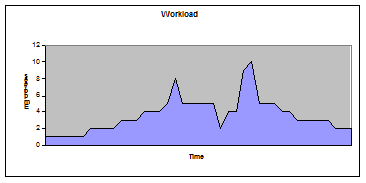
Back to our example, if we decide to round the number, the result of the above hour would be two. You do this math for every hour you are open and you end up with figure 1 below. If you lay out your workload through time, you’ll see the number of employees varying during the day. It directly reflects your customer’s flow.


Figure 1. Number of employees required per time of day


Some of you may say that since employees have a different productivity (some cashiers are faster than others for example), you could schedule according to the customer output directly. Why translate to number of employees, right? This would be the optimal way to schedule since you could have your fastest cashier on staff and therefore need one less cash register open, which would save you money. Then why isn’t it done this way? Simply to keep things manageable. Otherwise, a planner would need to measure against all sorts of different drivers to establish a schedule and it would become quite a challenge to manage. Imagine your fastest cashier calling in sick: does this mean you replace that person with two other cashiers? The daily management of the schedule would quickly become overwhelming. So be practical and express your workload in number of employees required.


The cashier workload is now ready. You’ll notice that in our example, there are some big peaks and valleys. The number of customers would require up to ten registers for one hour. In our store, not only we do not even have ten registers, but we can’t ask folks to come in for only one hour of work. There will be constraints (see chapter 4) that impose a minimum duration when someone is scheduled to work.


Again, to help yourself and for simplicity, you can smooth out the employee requirements by reducing the peaks that represent noise. The more your resolution gets to be precise, the more of these peaks you will see. The same goes for valleys where all of the sudden no cash register is required because you don’t expect customers between 9am and 10am let’s say. You’ll still need a minimum of one cashier open no matter what the customer count is. So in your translation exercise, put a minimum and a maximum. Also, look at differentials between the previous hour and the next hour. For example, if you need 2 cashier for one hour, then 10 cashiers for the next hour, then again 3 cashiers for the next two hours, you can see that this 10 should be 3 or 4 but will not be 10. Rule of thumb: when you have peaks like this, you may have the ability to schedule shifts that overlap (the end of the shift overlaps by one hour the beginning of the next one). Therefore, you can make this workload at the previous hour (2) added to the next hour (3) and make that number a 5 instead of a 10.


The same logic applies to valleys, but in this case, you may elect to keep the valleys intact and not readjust according to the previous and next hours. These valleys will allow you to schedule breaks later in the process or dispatch the time independent workload.


This daily workload not only will be different on each weekday, but will also change from week to week as seasonal patterns will influence customer behavior. Holiday season will have higher traffic than the beginning of the year when no special events are happening. Total volume will therefore change from week to week.

Posted in 2.2.1-Time Dependant Workload | Tags: Constraints, Employee, Positions, Schedule, Scheduling, Scheduling software, Shifts, Workforce, Workload |

Time Dependant Workload (Part 1 of 2)

15th August, 2013 · andrehoude · Leave a comment

Let’s take the Cashier workload and analyze how we will quantify that one. This workload has only time dependant tasks and therefore is directly related to the number of customers showing up at the cash register. These customers will have different number of items to buy and will pay through different methods (cash, credit, check, etc). As explained earlier, each customer will take some time to check out and each cashier will have a limited capacity in number of customers.

The first thing to do is to pick a resolution and a unit of measure. The unit of measure is the time it takes to serve a customer. The resolution is the period of time where you will measure the count of customers. You can count the number of customers per 15 minutes or per hour or anywhere below, above, or in between. Usually, you choose a resolution that is manageable depending on the tools you have. If you have a pen and paper, I would suggest never going lower than one hour. If you use Excel, you could manage all the way down to 30 minutes. High end software allow for as low as 5 minutes in some cases.


You may wonder why would anyone manage a schedule down to the 5-minute increment? In our simplified example of one store, the amount of time to service a customer will be counted in minutes. No point in counting seconds because I have four cash registers which of only two are open most of the time. So if I say it takes 55 seconds to serve a customer and I round it up to one minute to keep my math simple, the difference on the week is insignificant. Take 5 seconds times the number of customers visits, say two thousand, makes 10,000 seconds a week, which is roughly 3 hours over the whole schedule. Not much. By padding the time required to serve a customer, you are adding hours to your workload quantity that is not necessarily required but that saves you aggravation and funny math.


But if our grocery store is successful and if we buy more stores and now have a chain of hundreds of store, you can multiply that 3 hours by 200 stores which makes 600 hours of extra time scheduled. Use any hourly amount, it starts to become significant. And if you perform the same exercise for all tasks, your over-scheduled number becomes very significant. This is why large enterprises do buy software that measure to the second the tasks that are performed in order to reduce the waste that accumulates due to rounding. Your workload definitions will therefore get longer and more detailed and will be measured more precisely as you grow your business. It will be directly proportional. If you don’t, you are exposed to over scheduling once you get to the schedule.


So for the sake of simplicity in our example, we will pick a one minute per customer average serving time and a one-hour resolution. Therefore if it takes one minute to serve one customer, our cashier has a capacity of 60 customers per hour. We take the expected business of that hour (say we expect 100 customers), this would create 100 minutes of work to do in one hour. You divide the amount of work by the resolution (100/60) and you get 1.66 employees. Since you can’t schedule two thirds of a person, you have to decide what to do with the fraction (do you schedule someone or not). You may elect to cut the fraction all the time, make the fraction whole all the time (if the result is 1.1, make it 2) or simply round the result. This will have a direct impact on service and cost. If you decide to cut the fraction all the time, it’s good for cost, but bad for service. If you decide to make the fraction whole all the time, it’s good for service but bad for profit. You could also decide to have a different rule depending on the relative part of the fraction. In the math above 0.66 out of 1.66 is a big proportion. You could have a requirement for 10.66 employees. In this case, deciding between 10 or 11 employees will have a much reduced impact on customer service because the capacity is not greatly affected (versus choosing between 1 or 2 employees which represents 50% reduction in capacity). You can already feel that even though you haven’t even started talking about employees, a simple rule of thumb decided by a planner may have a huge impact on the business’s success.


Posted in 2.2.1-Time Dependant Workload | Tags: Constraints, Employee, Positions, Schedule, Scheduling, Scheduling software, Shifts, Workforce, Workload |

Workload Quantification

15th August, 2013 · andrehoude · Leave a comment

There are two distinct perspectives of workload quantification that greatly influence a schedule. The first is the time-dependant service. For example, cashiers in our grocery store will be at their register at certain times. You would expect the number of cashiers available to grow as the customers come in. This work is time-dependant since the volume of customers walking in fluctuates with a direct dependency on the time of the day and the day of the week.


Best way to illustrate this example is to plan for only one cashier. This cashier will take a certain amount of time for each customer. If the customer volume is low, that cashier can handle the flow of let’s say 2 minutes per customer. So as long as no more than one customer walks in every 2 minutes, there is enough of one cashier. But if there is one customer every minute, then one cashier will not sustain the flow. Each minute, that cashier’s workload increases by 2 minutes because a customer was just added to the line. After 4 minutes, that cashier served 2 customers, and has 2 customers left in line. By the time the cashier takes care of these 2 other customers, another 4 customers are now waiting in line. So the scheduler should be planning for a second cashier during this increase of customer flow. That is a time-dependant work.


The second type of work relates to time-independent tasks. For example, our grocery store needs to stock shelves, clean the floor, etc. This type of task can be accomplished sometime during the day but does not have to happen at a specific time. It is independent of the business volume as to WHEN it will happen. It is not necessarily independent in duration since for example stocking shelves will take longer if you had a particularly busy day with lots of sales. But that task will not matter when you do it in the day (except of course if the shelves are empty…)


Let’s go back to our example and tag each task as to what it is: TD (Time Dependant) or TI (Time Independent)


Cashier:

1.e.i. TD: Service customer at register

2.a.i. TD: Open and close register

Bagger:

1.a.i. TI: Clean entrance

1.b.i. TI: Gather carts from parking lot

1.e.ii. TD: Bag the items

1.f.i. TI: Pick up carts around the exit

Clerk:

1.c.i. TI: Stock shelves

1.c.ii. TD: Service customer on item locations

2.b.ii. TI: Go through shelves inventory

2.c.i. TI: Empty truck

2.c.ii. TI: Store goods in storage room

2.d.i. TI: Stock shelves

Butcher:

1.d.i. TD: Service customer at butcher

1.d.ii. TI: Clean slicer and other bench tools

2.a.ii. TD: Prepare/store meat

2.b.i. TI: Go through meat inventory

Posted in 2.2-Workload Quantification | Tags: Constraints, Employee, Positions, Schedule, Scheduling, Scheduling software, Shifts, Workforce, Workload |

Workload Identification (Part 2 of 2)

15th August, 2013 · andrehoude · Leave a comment

In this step, you don’t decide which employee takes that task on, you simply decide which job profile should be doing this or which word will categorize some tasks that should be done by the same person. This also helps you determine what you need to hire and what profile you should be looking for. In our example, we’ll simply use the employee’s job titles (bagger, cashier, clerk, butcher).


  1. Customer Experience
    1. Customer walks in
      1.                                                                i.      Bagger: Clean entrance
    2. Customer picks up a cart
      1.                                                                i.      Bagger: Gather carts from parking lot
    3. Customer walks through the aisles and picks from their grocery list
      1.                                                                i.      Clerk: Stock shelves
      2.                                                               ii.      Clerk: Service customer on item locations
    4. Customer stops at the butcher’s to ask for some sliced ham
      1.                                                                i.      Butcher: Service customer at butcher
      2.                                                               ii.      Butcher: Clean slicer and other bench tools
    5. Customer goes to the cash register and pays
      1.                                                                i.      Cashier: Service customer at register
      2.                                                               ii.      Bagger: Bag the items
    6. Customer takes bags and leaves
      1.                                                                i.      Bagger: Pick up carts around the exit


  1. Other Events
    1. Open/Close store
      1.                                                                i.      Cashier: Open and close register
      2.                                                               ii.      Butcher: Prepare/store meat
    2. Perform inventory
      1.                                                                i.      Butcher: Go through meat inventory
      2.                                                               ii.      Clerk: Go through shelves inventory
    3. Receive delivery trucks
      1.                                                                i.      Clerk: Empty truck
      2.                                                               ii.      Clerk: Store goods in storage room
    4. Stock shelves
      1.                                                                i.      Clerk: Stock shelves


If we gather them back in a different view by workload, we get this list:

Cashier:

1.e.i. Service customer at register

2.a.i. Open and close register

Bagger:

1.a.i. Clean entrance

1.b.i. Gather carts from parking lot

1.e.ii. Bag the items

1.f.i. Pick up carts around the exit

Clerk:

1.c.i. Stock shelves

1.c.ii. Service customer on item locations

2.b.ii. Go through shelves inventory

2.c.i. Empty truck

2.c.ii. Store goods in storage room

2.d.i. Stock shelves

Butcher:

1.d.i. Service customer at butcher

1.d.ii. Clean slicer and other bench tools

2.a.ii. Prepare/store meat

2.b.i. Go through meat inventory


You notice that the clerk seems to have the longest list. He also has a redundant task (stock shelves is listed twice). This is simply because of the way we approached the list of things to do. It is normal to find things redundant at some point and question and skin this list at any time in the process. Remember: change is the only constant.


As you can see, you can quickly identify basic tasks and activities and categorize them into a workload that makes sense. These categories are the identification of your workload. They are what will be assigned to the employees and therefore represent your translation between the business and the schedule.

Posted in 2.1-Workload Identification | Tags: Constraints, Employee, Positions, Schedule, Scheduling, Scheduling software, Shifts, Workforce, Workload |

Workload Identification (Part 1 of 2)

15th August, 2013 · andrehoude · Leave a comment

Establishing what you’re doing

How do you get to that list of things to do? The first thing you need to do at a high level is to establish the business you do. What is your business and what do you provide your customer? Let’s walk through a simplified example of a grocery store[1].


Say I’m the new proud owner of a grocery store with four cash registers. Now as the new proud owner, I need to determine my hours of operations: when am I open for business? Ideally, you already know when you have the best traffic of customers in your store and you know the weekly patterns of your customer’s habits. These patterns will be greatly influenced by the area you are in: if you are in an area where a lot of retired folks reside, you are more likely to get traffic during the day time. If you are in an area where young families live, you’ll get high peaks just before meals when parents realize they have no clue what to cook for dinner and they’re stopping to get something after work just before getting home. So knowing your area will be important if you want to provide good service and help you decide on your opening hours. In order to keep our example simple, we’ll make our opening hours 9am to 9pm every day of the week.


Next step is to list what employees have to do when the store is open and when it is closed. In order to list what everyone needs to do, it is always easier to categorize and keep things as simple as possible. I mentioned the importance of categories in the introduction and you’ll see the effect it has here.


The first thing to do is to walk through the customer’s experience and identify what he does.


  1. Customer Experience
    1. Customer walks in
    1. Customer picks up a cart
    2. Customer walks through the aisles and picks from their grocery list
    3. Customer stops at the butcher’s to ask for some sliced ham
    4. Customer goes to the cash register and pays
    5. Customer takes bags and leaves


You also know that there are tasks that are around specific events in a day or in a week that are not related directly related to a customer’s experience. You need to add these as well.


  1. Other Events
    1. Open/Close store
    2. Perform inventory
    3. Receive delivery trucks
    4. Stock shelves


Now what? From each of these steps, you can identify tasks and activities that are related to the steps you just outlined.


  1. Customer Experience
    1. Customer walks in
      1.                                                                i.      Clean entrance
    2. Customer picks up a cart
      1.                                                                i.      Gather carts from parking lot
    3. Customer walks through the aisles and picks from their grocery list
      1.                                                                i.      Stock shelves
      2.                                                               ii.      Service customer on item locations
    4. Customer stops at the butcher’s to ask for some sliced ham
      1.                                                                i.      Service customer at butcher
      2.                                                               ii.      Clean slicer and other bench tools
    5. Customer goes to the cash register and pays
      1.                                                                i.      Service customer at register
      2.                                                               ii.      Bag the items
    6. Customer takes bags and leaves
      1.                                                                i.      Pick up carts around the exit


  1. Other Events
    1. Open/Close store
      1.                                                                i.      Open and close register
      2.                                                               ii.      Prepare/store meat
    2. Perform inventory
      1.                                                                i.      Go through meat inventory
      2.                                                               ii.      Go through shelves inventory
    3. Receive delivery trucks
      1.                                                                i.      Empty truck
      2.                                                               ii.      Store goods in storage room
    4. Stock shelves
      1.                                                                i.      Stock shelves


You’ve just identified some work to do. It‘s not yet your workload.  You can now take that list and categorize it according to words you would use when telling an employee what to do. In our example, if we tell an employee « you’ll be cashier today », the word ‘cashier’ represents work that both the planner and the employee can relate to. Usually, you can use the same words as a job or a position or a type of employee that will have the skills to perform this work. But it’s important to remember that even though you use the same words for simplicity, they represent two different things: one is the workload, the other is the employee’s job title.


[1] Author’s note: I apologize in advance to those of you who are working in a grocery store. I am fully aware that the example does not necessarily reflect your reality. The example is chosen only because most of us have been in a grocery store and can relate to the tasks listed in this example. Thank you for your understanding.

Posted in 2.1-Workload Identification | Tags: Constraints, Employee, Positions, Schedule, Scheduling, Scheduling software, Shifts, Workforce, Workload |

Maintaining the schedule

15th August, 2013 · andrehoude · Leave a comment

Don’t be afraid to change the plan

As mentioned in a previous entry, a schedule is simply a plan for the future and until it happens, it can change. Those of you with experience in planning will know that as soon as you communicate the schedule to someone, some event will happen to make that schedule invalid and force changes.


Any one of these events will cause a schedule to change and force the planner to redo one or more of the previous steps:

  1. A change in workload (big customer takes priority with a last minute request, last minute sale causes customer traffic increase, etc)
  2. A change in employee information (an employee forgot to give the planner unavailability, employee has just quit, HR just told you about a new employee starting, etc)
  3. A change of context (machine just broke down, snow storm is coming tomorrow, etc)
  4. Etc


There are hundreds if not thousands of examples where a new piece of information causes a planner to redo the schedule on an on-going basis basically making it a full time job.


The problem here is that once the schedule is posted and communicated, the planner can’t change the whole schedule. Employees now have shifts on which they base their own decisions about their lives. A planner can’t just come in and start from scratch. That published schedule now becomes a constraint and must endure as little changes as possible while answering the change of business.


It is in this step that most last minute decisions cause additional costs. A planner with no tool or no guidelines will make the decision that will make the immediate problem go away with little regards to the final cost.

Posted in 1.4.5-Maintaining the schedule | Tags: Constraints, Employee, Schedule, Scheduling, Scheduling software, Shifts, Workforce, Workload |

Distributing Shifts

15th August, 2013 · andrehoude · Leave a comment

You’ve got shifts and now you need to assign them.


Different measures may influence the way you place shifts:

  1. Fairness: do you distribute weekend or night shifts fairly
  2. Shift count: do all weekdays have the same amount of shifts
  3. Constraints: do you have complex constraints to look at


The first thing to do is to identify the days with the most shifts to assign. The planner will need to start with these days since they are the days where most people are needed (and the days that in theory, the planner kept the most capacity).


While placing these shifts, the planner will start with the shifts that will be measured for fairness and that need to be distributed fairly. Usually, counters are kept on fairness to determine who’s next to get the bad shift (or the good shift depending on what you measure).


The constraints are looked at when you get to assign the other days (usually the ones surrounding the busiest days and working outwards). You would then complete your schedule finishing with the day that has the lowest number of shifts to assign.


To make this step easy, the planner must be prepared with measures and counters. The more prepared the planner and the better the previous three steps are accomplished, the easier this step will be.


Posted in 1.4.4-Distributing Shifts | Tags: Constraints, Employee, Positions, Schedule, Scheduling, Scheduling software, Shifts, Workforce, Workload |

Planning the non-work

15th August, 2013 · andrehoude · Leave a comment

Non-work is one of the most essential pieces of the puzzle


Each position represents a pre-determined capacity of work. Once that position is filled with an employee, that capacity is reduced by the constraints they have (vacation, breaks, etc).


Therefore, a planner must schedule the non-work first and remove the work capacity first before trying to assign the work. Although this seems to be in reverse order of what someone should do, it is essential to start with this step. Training, vacation, holidays, meetings and all other types of events that do not contribute to the core workload need to be scheduled first.


While placing this reduction of capacity, the planner can keep an eye on just that: the remaining capacity. On every day of every week, there is a potential of work assignments that remain and that are not removed. If the planner can keep daily and weekly capacity totals above the required workload, then the planner may have an easier job when distributing the actual work afterwards (I did say may since the individual constraints could prevent some shift assignments).


It is in this step that you must involve the employees as often and as transparently as possible. You need to gather the information about time off early and often. You need to establish deadlines (reasonable ones) for the employees to make their requests. You need to remind them often of the upcoming deadlines. Etc.


If you don’t involve your employees or don’t ask, they will only ask once they see the schedule and see that you scheduled them on a day they wanted off. Then the planner won’t be able to give them the day off. Then the employee will be pissed because they never ask for anything and never miss work and that’s how they are treated. Then when that day comes, that employee will call in sick. Then the planner will have to make a hasty decision and call someone on overtime. All this because you didn’t ask early enough…


The point in this step is that non-work is one of the most essential pieces of the puzzle because everyone is concerned about unproductive time (management because of the cost, employees because it’s their time off, etc). Keeping an eye on capacity early and often is key.


Posted in 1.4.3-Planning the Non-Work | Tags: Constraints, Employee, Non-Work, Positions, Schedule, Scheduling, Scheduling software, Workforce, Workload |

Calculating Positions

15th August, 2013 · andrehoude · Leave a comment

In our case, a position refers to the hiring of one employee with specific constraints. For example, someone is hired to be cashier on a full time basis. Therefore, a schedule will be built using multiple positions (each with the same or different constraints). Positions are also referred to as a line or a row in a schedule. Each position will accept one or more shifts on different days in order for that position to be handed off to an employee.


That position also has a maximum capacity of work each day and each week. That position is also entitled to time off and sickness which reduces the capacity of the position. Absenteeism and rest can make an employee work only 75% of the time (depending on the number of vacation days, culture, break times, training, etc).


This means that even though you would have 40 hours of shifts to give every week, one employee is not sufficient. The number of positions you need are based on many factors:

  1. The number of shifts and their total durations: calculate the number of positions on the sum of shifts and not the workload
  2. The daily variation of shifts: There may be a different number of shifts required on each day for different positions
  3. The seasonal variation of workload: vacation resorts are exposed to seasonal demand where the number of positions will vary greatly during the year
  4. The demographics around your place of business: The people that surround you place of business make the pool of potential employees. If you are surrounded by students, don’t open full time Monday to Friday jobs or at least minimize them.


Calculating positions is sometimes seen as a chicken or egg story[1]: should you create a schedule first and adjust the positions based on the schedule results, or should you estimate your positions and use them as a constraint on your schedule?


There are ways to calculate the positions you would require best to match your workload but they do ignore what you already have as employees. The important point in this step is that you must use the shifts that were built in step one and not use the sum of the workload as approximate numbers. The workload profile may come back to haunt you later down the road.


[1] Author’s irrelevant note: the chicken or egg story has been sorted out by Professor John Brookfield from the University of Nottingham who discovered that any animal’s DNA does not change during its lifetime which means that the egg had to come first with the DNA of the chicken.


Posted in 1.4.2-Calculating Positions | Tags: Constraints, Employee, Positions, Schedule, Scheduling, Scheduling software, Workforce, Workload |
Previous Posts
Next Posts

Pages

  • Home
  • Services
  • Read All About It
  • Exercises
  • Contact Us
  • About the Author

Archives

  • August 2013

Categories

  • 0-Preface (1)
  • 1-Introduction (14)
    • 1.1-Everybody Schedules (1)
    • 1.2-Change is the only constant (1)
    • 1.3-Workforce Scheduling (4)
      • 1.3.1-The Workload (1)
      • 1.3.2-The Employees (1)
      • 1.3.3-The Constraints (1)
    • 1.4-The Process (5)
      • 1.4.1-Breaking down the work (1)
      • 1.4.2-Calculating Positions (1)
      • 1.4.3-Planning the Non-Work (1)
      • 1.4.4-Distributing Shifts (1)
      • 1.4.5-Maintaining the schedule (1)
    • 1.5-Finding Support (2)
      • 1.5.1-Strategy becomes input (1)
      • 1.5.2-Choosing Tools (1)
  • 2-Build your workload (10)
    • 2.1-Workload Identification (2)
    • 2.2-Workload Quantification (7)
      • 2.2.1-Time Dependant Workload (2)
      • 2.2.2-Time Independant Workload (1)
      • 2.2.3-Mixed Workloads (1)
      • 2.2.4-Open and close times (1)
      • 2.2.5-The Wiggle Room (1)
    • 2.3-Other Alternatives (1)
  • 3-Understand the workforce (9)
    • 3.1-Arriving (4)
      • 3.1.1-Training (1)
      • 3.1.2-Workload and Absenteeism (1)
      • 3.1.3-Demographics (1)
    • 3.2-Staying (4)
      • 3.2.1-The idiot virus (1)
      • 3.2.2-Set Expectations (1)
      • 3.2.3-Share Information (1)
      • 3.2.4-Self Scheduling (1)
    • 3.3-Leaving (1)
  • 4-Define your constraints (13)
    • 4.1-Work and Rest (6)
      • 4.1.1-Shift Constraints (1)
      • 4.1.2-Day Constraints (1)
      • 4.1.3-Week Constraints (1)
      • 4.1.4-Horizon Constraints (1)
      • 4.1.5-Sequence Constraints (1)
    • 4.2-Fairness and Rotations (3)
      • 4.2.1-What About Seniority? (1)
      • 4.2.2-Self Scheduling (1)
    • 4.3-Training (1)
    • 4.4-The Agreement (1)
    • 4.5-Breaking the Rules (1)
  • 5-Assembling a Schedule (3)
    • 5.1-Breaking Down the Work (3)
      • 5.1.1-Time Dependant Workload (2)
  • 6-It's Never Over (1)
  • 7-Exercise (4)

WordPress

  • Log in
  • WordPress

Subscribe

  • Entries (RSS)
  • Comments (RSS)
© Schedonomy 2013-2022. All Rights Reserved. SCHEDONOMY is a trade-mark owned by Louis-Marielle Holdings Inc. and used under license
  • Home
  • Services
  • Read All About It
  • Exercises
  • Contact Us
  • About the Author